

JDE Orchestrator Examples
JD Edwards Orchestrator is one of the most powerful tools in your JDE environment, but many organizations only use a fraction of its potential.
At ERP Suites, we help organizations design, deploy, and scale orchestrations that eliminate manual work, improve data accuracy, and connect JD Edwards to the rest of the business.
Explore JD Edwards Orchestrator
Get inspired with real-world JD Edwards Orchestrator ideas, prebuilt rapid solutions, and resources designed to help your team automate faster and scale smarter.

Rapid Orchestrations
Each automation is based on orchestrations we’ve successfully implemented for other JD Edwards customers and rebuilt specifically for your environment.
You’ll get the benefit of a proven solution, plus the confidence that it’s tailored to your data, security model, and business logic. No starting from scratch. No extra strain on your team.
Typically deployed in 2–5 days
Delivered by ERP Suites consultants inside your JDE system
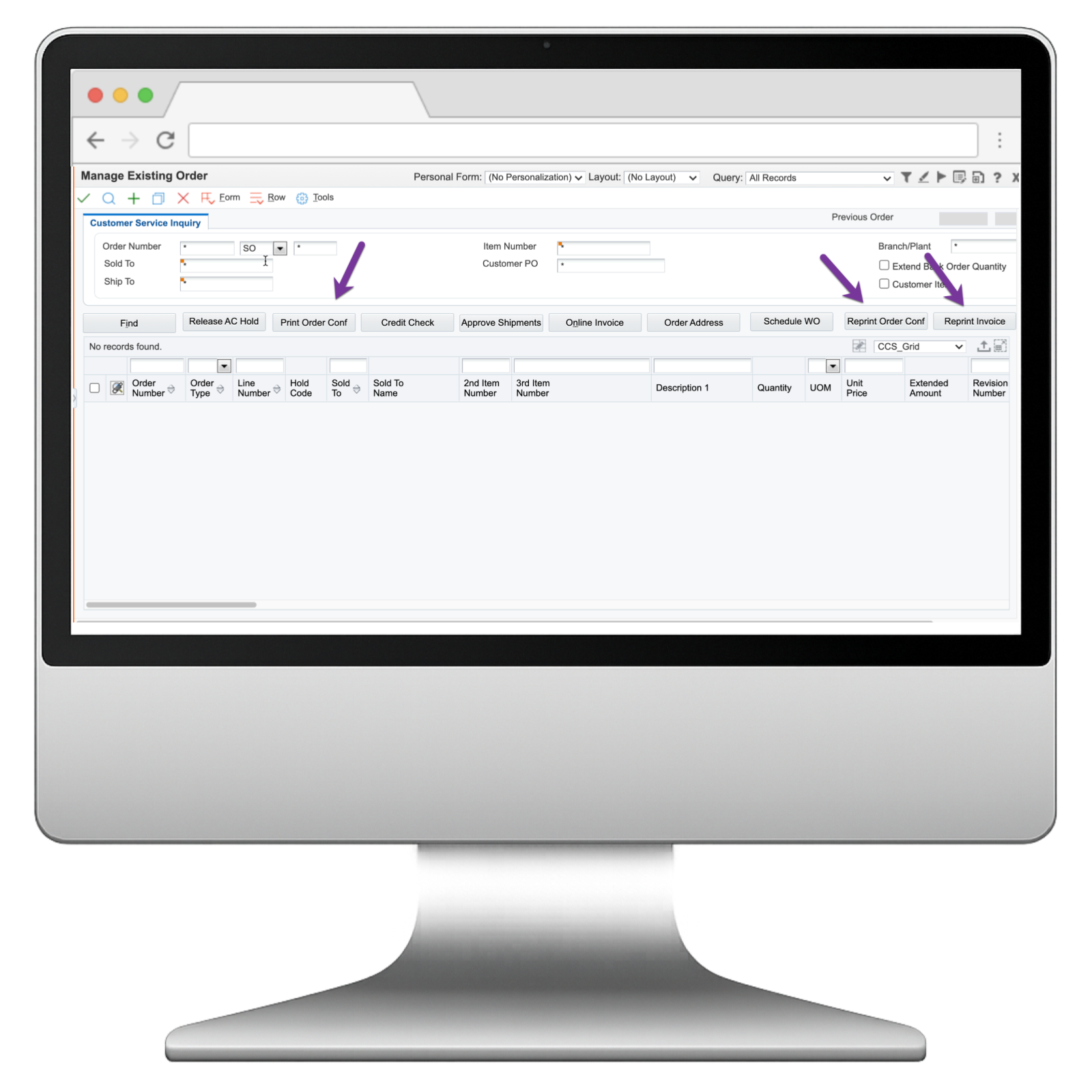
Designed to embed buttons directly into your existing screens
Quick Wins
Focus on quick wins like these Orchestrator use cases to earn support for more complex initiatives. You can cut development time by adopting one of our ready-to-use orchestrations.
Sync ERP records
Where's the source of truth in a multi-ERP organization? If your records are out of sync, build and integrate an orchestration to continuously validate and update data. We took this approach to sync address book, tax, and pay scale data between JDE and SAP.
Validate addresses
Sales and other sources continuously feed JDE new customer contact information. It can take hours to verify these addresses externally. We built an address validation orchestration to perform the lookups immediately
Perform routine IT tasks
Routine JDE CNC tasks are cumbersome and slow down UDO implementations. We created a suite of Composed Pages that leverage Orchestrator’s ability to call AIS functions to reset web cache quickly.
Look up currency rates
Currency exchange rates fluctuate constantly. How often do you edit JDE to reflect the changes? We built an orchestration to perform the lookups and update JDE automatically.
Import expense sheets
An ERP Suites customer was exporting .xls expense sheets from a mobile tracking app. Then, Accounting manually entered the data in JDE. We built a Composed Page so they could upload the file instead. An orchestration enters the data automatically.
Post current inventory levels
Sluggish load time leads to poor customer experience. And that could cost you an account. We used CDI ERP2Web as a customer service portal and added an orchestration to pull inventory and pricing data from JDE—all in real-time.
Advanced Use Cases
Partner with business leaders to identify and prioritize projects that improve efficiency, customer experience, agility, or risk management. Orchestrator uses cases like these may involve multiple integrations or scripting. We’re here to help you succeed with Orchestrator training, advanced development, and troubleshooting.
Map data to Excel
JDE users often prefer to work inside Excel, but the integration doesn't exist. We designed an Add-in that puts Orchestrator in the Microsoft toolbar. Users can select a server, specify an orchestration, and map their fields dynamically.
Print packing labels
Meet shipping requirements with improved speed and accuracy by integrating production line devices. We used orchestrations to pull JDE product data and print a label the instant that a package is scanned for packing.
Automate journal entries
Large corporations generate thousands of journal entries that must be uploaded into JDE General Ledger. We used Automation Anywhere's MetaBot and Orchestrator to take in the entries, add the data to the ledger, and post it simultaneously.
Trigger a device
Manual manufacturing processes are time-consuming and prone to human error. We built an orchestration to trigger an XRF analyzer automatically and send the data to JDE. Then, we connected the device to a Raspberry Pi to keep it mobile.
Eliminate paper processes
Paper processes are costly and limit global visibility. We led an orchestration project to pull production information from PlantStar's data collection devices. Then, we used CaféOne to present it in a user-friendly dashboard in JDE.
Generate reprint pick slips
It typically takes 15 steps to generate reprint pick slips and other reports. Do it one. We used Oracle JET, E1 Pages, and orchestrations to execute reports and display the PDF in a new browser window. Now we simply enter a pick slip number and hit submit.
MOBILE/DESKTOP APP SOLUTIONS
Enroll in benefits
The traditional JDE open enrollment process doesn't easily accommodate life's interruptions. Our orchestration-based app enables employees to review, select and make changes—in their native language—throughout the benefit period.
Approve a PO
Bypass the time and effort it takes to navigate JDE, find POs waiting, and approve or reject. Our orchestration-based app lets managers quickly execute time-sensitive approvals and keep work flowing.
View and edit customer information
Deliver speed, simplicity, and insight to users with limited JDE exposure—like Sales. Solutions built on orchestration travel well too. Our My Customers mobile app enables salespeople to review and edit customer info right on their smartphone.
Orchestrator Resources
Access curated Orchestrator content built to help you plan, build, and scale automation with confidence. These resources include proven frameworks, implementation tips, and expert insights.
Common Questions About JD Edwards Orchestrator
What version of JD Edwards do I need?
Orchestrator Studio requires JD Edwards EnterpriseOne Tools Release 9.2.1.2 or higher.
How do I know which Orchestrator use cases are best for my business?
The best Orchestrator opportunities usually come from high-volume tasks that are repetitive, manual, and prone to delays or errors. If your team relies heavily on emails, spreadsheets, or manual approvals, there is a strong chance Orchestrator can streamline the process and improve speed and accuracy.
How long does it take to implement an orchestration?
Implementation time depends on complexity, but many orchestrations can be delivered quickly once the use case is clearly defined. Simple alerts and workflow automations can often be deployed in a short timeframe (couple days), while integrations and multi-step processes may require more planning, testing, and governance alignment.
Does Orchestrator require custom development?
Orchestrator is designed to reduce the need for custom development by using JD Edwards-native tools such as form requests, business services, and REST-based integrations. While it can be extended as needed, most orchestration projects focus on configuration-based automation rather than custom coding.
What is the ROI of JD Edwards Orchestrator?
Organizations typically see ROI through reduced manual work, fewer errors, faster approvals, and improved responsiveness across operations. The biggest value often comes from removing delays in processes that directly impact cash flow, customer satisfaction, and productivity.