

Reconciliation Agent
The Reconciliation Agent continuously aligns subledger and general ledger data in JD Edwards, identifying variances before they impact your close. It investigates root causes and recommends or creates corrective actions so your team spends less time chasing issues and more time finalizing results.
What Can the Reconciliation Agent Do?

The Reconciliation Agent transforms reconciliation from a periodic task into a continuous, intelligent process. Instead of waiting until close, it surfaces discrepancies as they happen, explains why they occur, and helps your team resolve them quickly with guided or automated actions.
By combining transaction-level analysis with an understanding of JD Edwards processes and configuration, it not only fixes issues, it helps prevent them from recurring.
Use it when reconciliations are manual and time-consuming, variances are difficult to trace, or teams need better visibility and faster resolution during close.

Reconciliation Agent Demo
See the Reconciliation Agent in action, comparing data, surfacing discrepancies, and guiding your team through resolution with clear insights and next steps.
In this short demo, you’ll see the agent:
- Compare datasets and identify matching vs mismatched records
- Detect discrepancies and highlight exact differences in amounts or transactions
- Review detailed explanations and recommended corrective actions
- Interact with the agent to ask questions and explore results
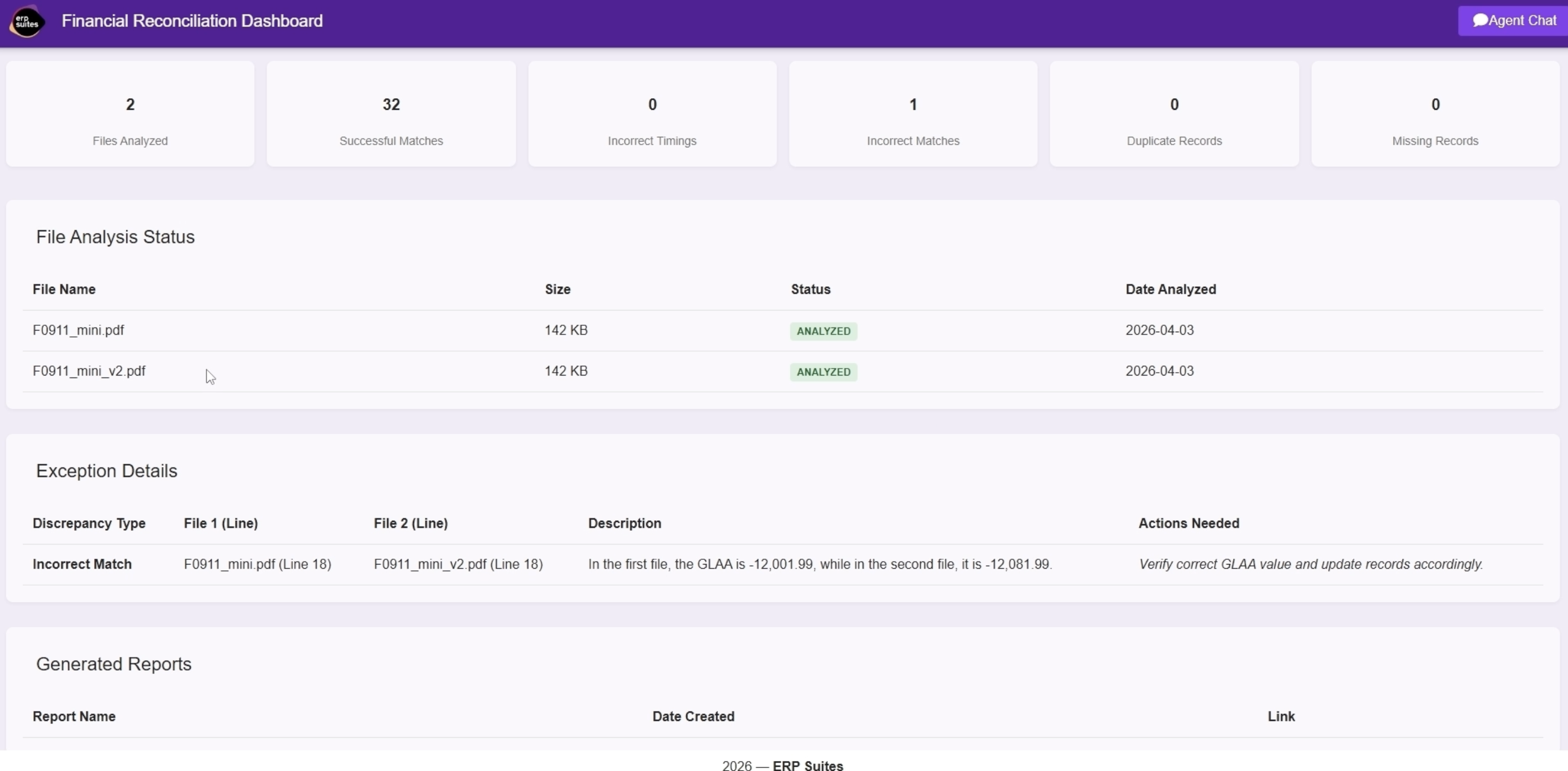
- Generate downloadable reconciliation reports for sharing and audit
- Monitor reconciliation status through a centralized dashboard

Reconciliation Agent Process Flow
From intake through resolution, the Reconciliation Agent standardizes and automates each step of the reconciliation workflow. It ensures discrepancies are identified, analyzed, and resolved efficiently, while keeping your team informed and in control.
.png?width=940&height=788&name=Reconciliation%20AI%20Agent%20Process%20(1).png)
How it Works
Built to run natively within JD Edwards, the Reconciliation Agent executes reconciliation logic, evaluates discrepancies, and coordinates resolution workflows while maintaining alignment with system controls.

Connects to Financial Data Sources
The agent continuously monitors reconciliation inputs, including:
- General Ledger balances (F0902)
- Subledger balances and transactions (F0911 and subledger detail tables)
- Reconciliation rules, tolerance thresholds, and account mappings
- Historical reconciliation results and prior period balances
• Ingests and normalizes data into reconciliation-ready formats
• Aligns transactions across ledgers using account, document, and reference fields
• Supports external files or datasets for cross-system reconciliation

Performs Reconciliation and Variance Analysis
The agent applies reconciliation logic aligned to JD Edwards structures:
- Compares GL balances to subledger totals at account and transaction levels
- Identifies variances including missing, duplicate, or misposted entries
- Flags out-of-balance conditions based on configurable tolerance thresholds
- Classifies discrepancies by type and severity
Each variance is evaluated with context to determine whether it can be resolved automatically or requires review.

Drives Resolution and Corrective Actions
For identified discrepancies, the agent:
- Prepares reconciliation drafts with supporting transaction detail
- Recommends or creates correcting journal entries (F0911)
- Identifies process gaps, master data issues, or configuration misalignment
- Suggests updates to processing options or account setup where needed
All actions align with JD Edwards processing standards and controls.

Logs Decisions and Enables Oversight
Every reconciliation step is tracked with full transparency:
- Variance identification and classification
- Root cause analysis and recommended actions
- Journal entries created or proposed
- Timestamped processing steps and decision logic
A centralized dashboard provides visibility into reconciliation status, exception trends, and resolution progress across accounts.
The Business Benefits
The Reconciliation Agent transforms reconciliation from a reactive, period-end activity into a continuous, intelligent process, helping your team resolve discrepancies faster and maintain confidence in financial data throughout the close cycle.

Reduces manual reconciliation effort and investigation time
Identifies variances earlier to prevent close delays
Improves accuracy by detecting missing, duplicate, or misposted transactions
Accelerates close with proposed or system-created correcting entries
Strengthens audit readiness with clear variance documentation