
JD Edwards Orchestrator Studio
Orchestrator Studio transforms JD Edwards into an automated, connected system that works the way your business actually operates.
Instead of relying on manual steps, emails, spreadsheets, or custom integrations, Orchestrator Studio allows teams to design, deploy, and manage automated processes directly within JD Edwards, without relying on developers or custom integrations.
How Orchestrator Studio Makes Automation Possible
Modern ERP innovation depends on systems being able to communicate with each other.
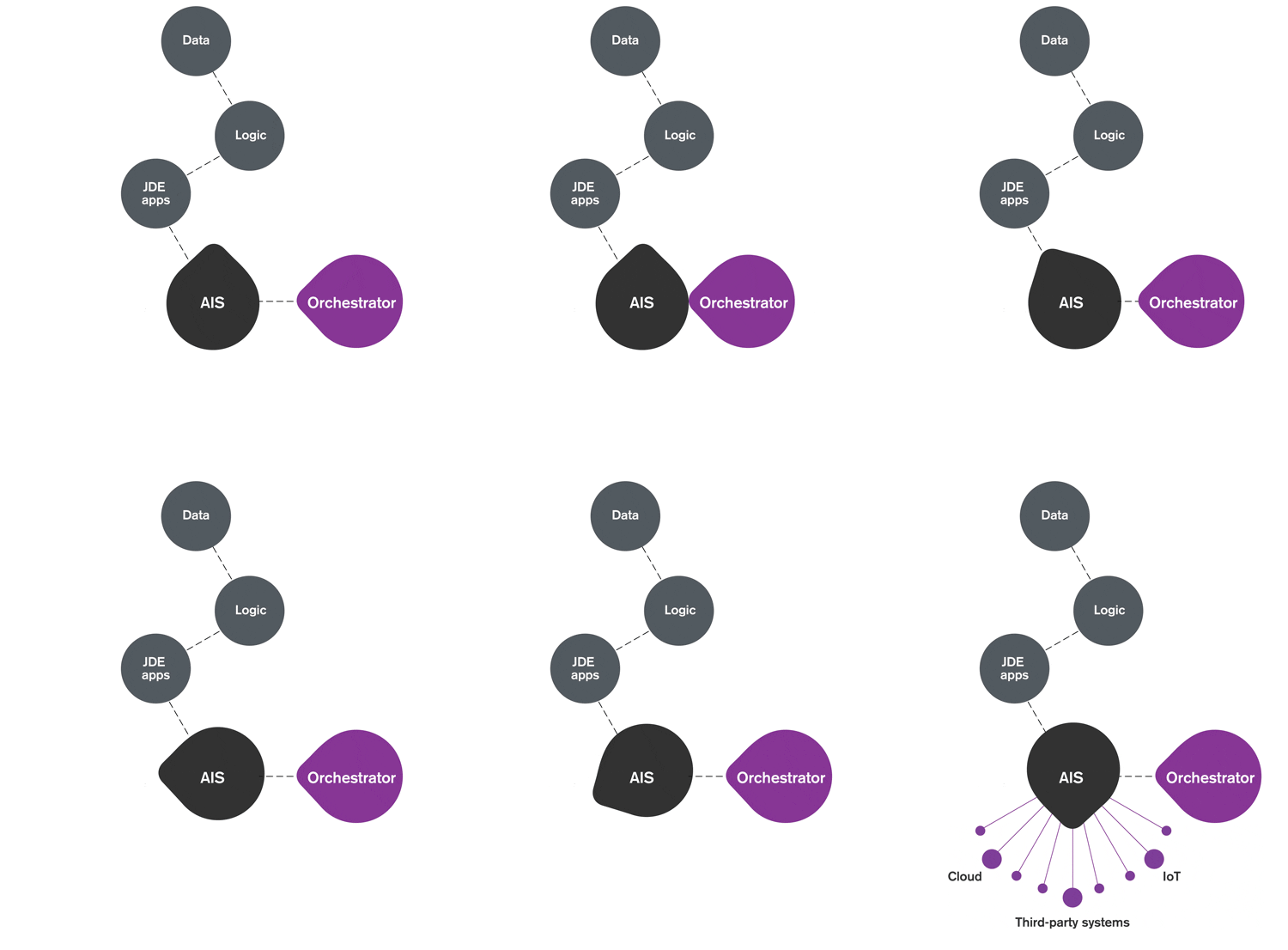
JD Edwards does this through Application Interface Services (AIS), which exposes JDE applications and data as APIs. While AIS provides the technical foundation, development isn't easy.
That's where Orchestrator Studio comes in. Orchestrator Studio removes that complexity by providing a user-friendly, graphical interface that allows teams to create and manage orchestrations visually, without heavy coding.
Connect your JDE system to the digital ecosystem with Orchestrator and AIS. We can help you design or refine your architecture plan for stress-free installation.
What You Can Do with JD Edwards Orchestrator
Orchestration feeds automation with effortless, real-time updates, but what does that mean in practice?
With Orchestrator Studio, you can:
-
Share, consume, and process data across E1 applications, devices, and software interfaces
-
Trigger actions using business events, schedules, or external requests
-
Link service requests to orchestrations and run processes automatically
-
Eliminate manual intervention while maintaining control and auditability
The result: faster processes, fewer errors, and consistent execution every time.

Get More Value, Faster
Want to skip the trial and error and jump straight into best practices?

Benefits of Orchestrations
JD Edwards Orchestrator was designed with the business analyst in mind because no one understands your processes better. When business insight is combined with IT governance, organizations achieve:

Increase Visibility
into workflows and data
Improve Accuracy
through automated execution

Accelerate Workflow
that scale with the business
What Have Others Done with JD Edwards Orchestrator?
From time-saving quick wins to IoT, ERP Suites customers have used orchestrations to push their businesses forward. Find inspiration in these and other successful use cases.
Perform routine IT tasks
Routine JDE CNC tasks are cumbersome and slow down UDO implementations. We created a suite of Composed Pages that leverage Orchestrator’s ability to call AIS functions to reset web cache quickly.
Sync ERP Records
Where's the source of truth in a multi-ERP organization? If your records are out of sync, build and integrate an orchestration to continuously validate and update data. We took this approach to sync address book, tax, and pay scale data between JDE and SAP.
Eliminate paper processes
Paper processes are costly and limit global visibility. We led an orchestration project to pull production information from PlantStar's data collection devices. Then, we used CaféOne to present it in a user-friendly dashboard in JDE.
Orchestrator Studio Questions
Do I need developers to use Orchestrator Studio?
No. Orchestrator Studio is designed for functional users and business analysts. Most orchestrations can be built and maintained using a graphical interface without heavy coding. IT involvement is typically focused on governance and security—not day-to-day changes.
How is Orchestrator Studio different from custom integrations?
Custom integrations are often brittle, expensive to maintain, and difficult to change. Orchestrator Studio is built natively for JD Edwards, allowing you to automate and integrate processes using supported tools that are easier to manage, update, and scale.
What systems can JD Edwards Orchestrator connect to?
Orchestrator Studio can connect to external systems using REST APIs, files, IoT devices, and third-party services. This makes it ideal for integrating JD Edwards with cloud applications, legacy systems, and partner platforms.
Can orchestrations run automatically or in real time?
Yes. Orchestrations can be triggered by:
-
Business events
-
Schedules
-
External requests
-
Real-time system activity
This allows processes to run automatically without manual intervention.
How long does it take to get started?
Many customers build their first orchestration in days. With the right use case and guidance, teams can see value quickly and expand automation over time.
What version of JD Edwards do I need?
Orchestrator Studio requires JD Edwards EnterpriseOne Tools Release 9.2.1.2 or higher.
What types of processes are best suited for orchestration?
Orchestrator Studio is ideal for:
-
Repetitive, high-volume processes
-
Approval workflows
-
Cross-system data exchanges
-
Event-driven or scheduled tasks
If a process is manual, time-consuming, or error-prone, it’s likely a strong orchestration candidate.
Orchestrator Learning Center
Whether you’re just getting started or ready to scale automation, our Learning Center gives you practical guidance to master JD Edwards Orchestrator and apply it to real business scenarios.
Ready to Orchestrate a Transformation?
You’ve seen the challenges. You’ve seen what’s possible. Now it’s time to turn automation into results.
JD Edwards Orchestrator Studio gives you the tools to automate. ERP Suites gives you the guidance to do it right.